 Google Ads
Table of Contents
- Alternative variants
- Getting Started
- Capabilities
- Settings
-
Developer Token (
developer_token) -
OAuth Client ID (
oauth_client_id) -
OAuth Client Secret (
oauth_client_secret) -
Access Token (
refresh_token) -
Account ID(s) (
customer_ids) -
start_date -
end_date -
User Agent for your OAuth Client (
user_agent) -
Conversion Window Days (
conversion_window_days) -
Primary Keys (
primary_keys)
-
Developer Token (
- Additional Setup Instructions
- Looking for help?
The tap-adwords Meltano extractor pulls data from Google Ads that can then be sent to a destination using a loader.
-brightgreen)







-1489-c0c0c4)
-6-c0c0c4)
Alternative variants #
Multiple
variants
of tap-adwords are available.
This document describes the default singer-io variant,
which is recommended for new users.
Alternative variants are:
Getting Started #
Prerequisites #
If you haven't already, follow the initial steps of the Getting Started guide:
Installation and configuration #
Using the Command Line Interface #
-
Add the
tap-adwordsextractor to your project usingmeltano add:meltano add extractor tap-adwords -
Configure the settings below using
meltano config.
Next steps #
Follow the remaining steps of the Getting Started guide:
- Select entities and attributes to extract
- Add a loader to send data to a destination
- Run a data integration (EL) pipeline
If you run into any issues, learn how to get help.
Capabilities #
Settings #
tap-adwords requires the
configuration
of the following settings:
-
developer_token -
oauth_client_id -
oauth_client_secret -
refresh_token -
user_agent -
customer_ids -
start_date
These and other supported settings are documented below. To quickly find the setting you're looking for, use the Table of Contents at the top of the page.
Developer Token (developer_token)
#
-
Environment variable:
TAP_ADWORDS_DEVELOPER_TOKEN
Your Developer Token for Google AdWord Application
How to use #
Manage this setting using
meltano config or an
environment variable:
meltano config tap-adwords set developer_token <developer_token>

export TAP_ADWORDS_DEVELOPER_TOKEN=<developer_token>
OAuth Client ID (oauth_client_id)
#
-
Environment variable:
TAP_ADWORDS_OAUTH_CLIENT_ID
Your Google OAuth Client ID
How to use #
Manage this setting using
meltano config or an
environment variable:
meltano config tap-adwords set oauth_client_id <oauth_client_id>

export TAP_ADWORDS_OAUTH_CLIENT_ID=<oauth_client_id>
OAuth Client Secret (oauth_client_secret)
#
-
Environment variable:
TAP_ADWORDS_OAUTH_CLIENT_SECRET
Your Google OAuth Client Secret
How to use #
Manage this setting using
meltano config or an
environment variable:
meltano config tap-adwords set oauth_client_secret <oauth_client_secret>

export TAP_ADWORDS_OAUTH_CLIENT_SECRET=<oauth_client_secret>
Access Token (refresh_token)
#
-
Environment variable:
TAP_ADWORDS_REFRESH_TOKEN
The Refresh Token generated through the OAuth flow run using your OAuth Client and your Developer Token
How to use #
Manage this setting using
meltano config or an
environment variable:
meltano config tap-adwords set refresh_token <refresh_token>

export TAP_ADWORDS_REFRESH_TOKEN=<refresh_token>
Account ID(s) (customer_ids)
#
-
Environment variable:
TAP_ADWORDS_CUSTOMER_IDS
A comma-separated list of Ad Account IDs to replicate data from
How to use #
Manage this setting using
meltano config or an
environment variable:
meltano config tap-adwords set customer_ids <customer_ids>

export TAP_ADWORDS_CUSTOMER_IDS=<customer_ids>
start_date
#
-
Environment variable:
TAP_ADWORDS_START_DATE
Determines how much historical data will be extracted. Please be aware that the larger the time period and amount of data, the longer the initial extraction can be expected to take.
How to use #
Manage this setting using
meltano config or an
environment variable:
meltano config tap-adwords set start_date YYYY-MM-DDTHH:MM:SSZ

export TAP_ADWORDS_START_DATE=YYYY-MM-DDTHH:MM:SSZ
end_date
#
-
Environment variable:
TAP_ADWORDS_END_DATE
Date up to when historical data will be extracted.
How to use #
Manage this setting using
meltano config or an
environment variable:
meltano config tap-adwords set end_date YYYY-MM-DDTHH:MM:SSZ

export TAP_ADWORDS_END_DATE=YYYY-MM-DDTHH:MM:SSZ
User Agent for your OAuth Client (user_agent)
#
-
Environment variable:
TAP_ADWORDS_USER_AGENT - Default:
tap-adwords via Meltano
The User Agent for your OAuth Client (used in requests made to the AdWords API)
How to use #
Manage this setting using
meltano config or an
environment variable:
meltano config tap-adwords set user_agent <user_agent>

export TAP_ADWORDS_USER_AGENT=<user_agent>
Conversion Window Days (conversion_window_days)
#
-
Environment variable:
TAP_ADWORDS_CONVERSION_WINDOW_DAYS - Default:
0
How many Days before the Start Date to fetch data for Performance Reports
How to use #
Manage this setting using
meltano config or an
environment variable:
meltano config tap-adwords set conversion_window_days 0

export TAP_ADWORDS_CONVERSION_WINDOW_DAYS=0
Primary Keys (primary_keys)
#
-
Environment variable:
TAP_ADWORDS_PRIMARY_KEYS - Default:
{"KEYWORDS_PERFORMANCE_REPORT"=>["customerID", "campaignID", "adGroupID", "keywordID", "day", "network", "device"], "AD_PERFORMANCE_REPORT"=>["customerID", "campaignID", "adGroupID", "adID", "day", "network", "device"]}
Primary Keys for the selected Entities (Streams)
How to use #
Manage this setting using
meltano config or an
environment variable:
meltano config tap-adwords set primary_keys '{...}'

export TAP_ADWORDS_PRIMARY_KEYS='{...}'
Additional Setup Instructions #
How to get your Customer ID(s) #
Customer ID(s) are also known as Account ID(s).
To get your Account ID(s):
- Visit the Google Ads management interface: https://ads.google.com/
- Log in if you haven’t already.
- Make sure the correct account is selected in the top left corner.
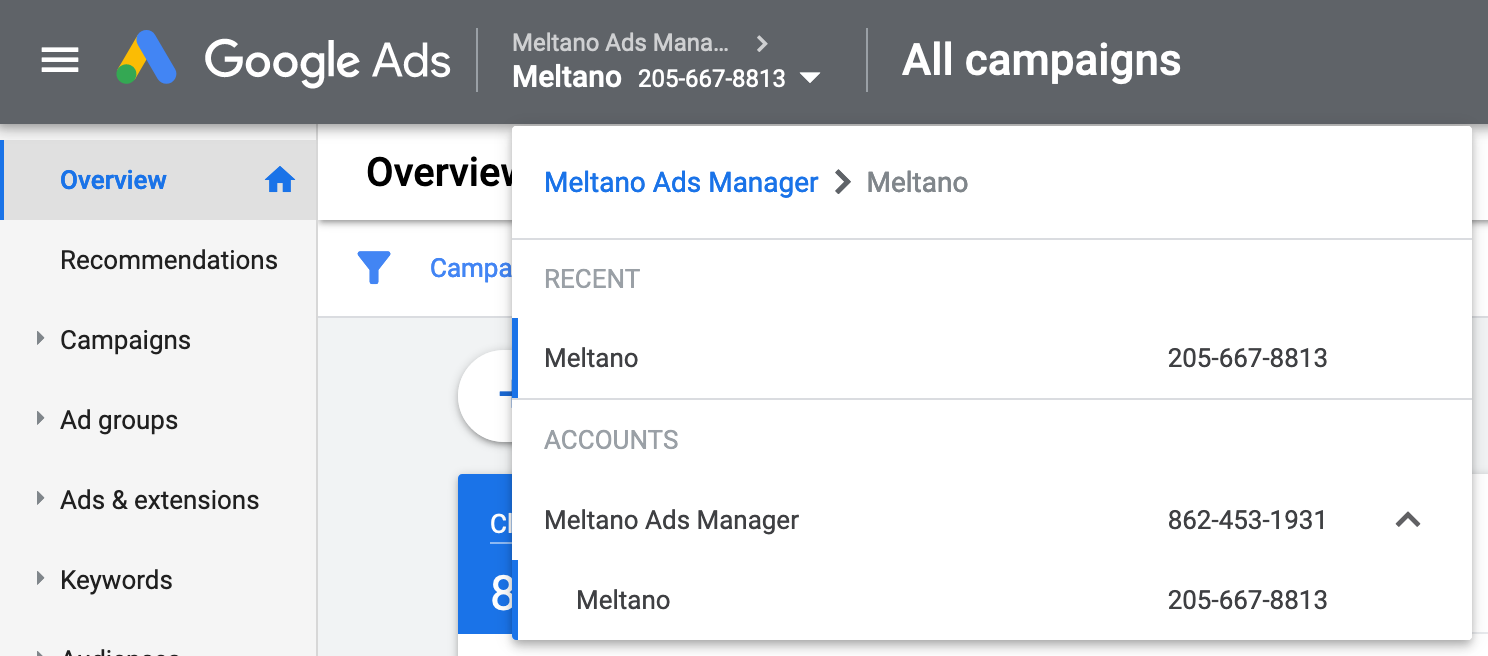
- You will see the Account ID displayed inside the selector to the right of the account name, with added dashes for readability.
Remove the dashes before you enter the ID in Meltano: 205-667-8813 becomes 2056678813.
If you want to extract data from multiple Ad Accounts, repeat the steps above to find the IDs (without dashes), and enter them in Meltano separated by commas (,).
For example:
- One Account ID:
1234567890 - Multiple Account IDs:
1234567890,1234567891,1234567892
How to use Primary Keys #
Manage this setting directly in your meltano.yml project file:
plugins:
  extractors:
  - name: tap-adwords
    variant: singer-io
    config:
      primary_keys:
        <REPORT_NAME>: [<key1>, <key2>]
        # ...
Alternatively, manage this setting using meltano config or an environment variable:
meltano config tap-adwords set primary_keys <REPORT_NAME> '["<key>", ...]'

export TAP_ADWORDS_PRIMARY_KEYS='{"<REPORT_NAME>": ["<key>", ...], ...}'

# Once primary keys have been set in `meltano.yml`, environment variables can be used
# to override specific nested properties:
export TAP_ADWORDS_PRIMARY_KEYS_<REPORT_NAME>=='["<key>", ...]'

# For example:
meltano config tap-adwords set primary_keys KEYWORDS_PERFORMANCE_REPORT '["customerID"]'

export TAP_ADWORDS_PRIMARY_KEYS_KEYWORDS_PERFORMANCE_REPORT='["customerID"]'
Looking for help? #
If you're having trouble getting the
tap-adwords extractor to work, look for an
existing issue in its repository, file a new issue,
or
join the Meltano Slack community
and ask for help in the #plugins-general channel.
Found an issue on this page? #
This page is generated from a YAML file that you can contribute changes to. Edit it on GitHub!